 EN
EN

Precision electronics work demands exceptional visual clarity, and nowhere is this more critical than when working with printed circuit boards. Whether you're a professional technician, electronics hobbyist, or repair specialist, having the right optical equipment can make the difference between successful repairs and costly mistakes. The intricate nature of modern PCB components, with their increasingly miniaturized designs and dense layouts, requires specialized tools that provide both magnification and accurate color representation to ensure precise workmanship.
Modern electronics manufacturing has evolved to incorporate components that are barely visible to the naked eye, making traditional magnifying glasses insufficient for detailed work. Surface-mount technology components, micro-BGA chips, and fine-pitch connectors require magnification levels that only digital microscopy can provide effectively. The transition from analog to digital viewing systems has revolutionized how technicians approach PCB repair and assembly, offering enhanced image quality, better ergonomics, and improved documentation capabilities.
The investment in quality optical equipment pays dividends through improved work accuracy, reduced eye strain, and faster completion times. Professional repair facilities and manufacturing environments increasingly rely on digital microscopy solutions to maintain quality standards and meet productivity targets. Understanding the specific requirements of PCB work helps in selecting equipment that delivers optimal performance for soldering applications.
Essential Features for PCB Soldering Applications
Magnification Range and Optical Quality
The magnification requirements for PCB work typically range from 10x to 200x, depending on the component size and complexity of the task. Lower magnifications around 10x to 50x are suitable for general inspection and larger component placement, while higher magnifications between 100x and 200x become necessary for micro-soldering applications and detailed quality control inspections. The optical system must maintain sharp focus across the entire magnification range without significant distortion or color aberration.
Digital sensors play a crucial role in image quality, with higher resolution sensors providing better detail recognition and more accurate color reproduction. Modern systems typically feature sensors ranging from 2MP to 12MP, with the higher resolution options offering superior zoom capabilities and clearer fine detail visibility. The sensor quality directly impacts the ability to distinguish between different materials, identify component markings, and detect potential defects during the soldering process.
Lens quality significantly affects the overall performance of the microscope for soldering applications, with multi-element designs providing superior sharpness and reduced chromatic aberration compared to single-element alternatives. Professional-grade lenses maintain consistent performance across the entire field of view, ensuring that components at the edges of the viewing area remain as clear as those in the center.
Display Technology and Ergonomics
Screen size and display technology significantly impact user comfort and work efficiency during extended soldering sessions. Larger displays, typically ranging from 4.3 inches to 10 inches or more, reduce eye strain by providing a comfortable viewing experience without requiring users to lean in close to the equipment. High-resolution displays with at least 1080p resolution ensure that fine details remain clearly visible even when working at moderate magnifications.
The display's color accuracy becomes particularly important when working with color-coded components or when documentation requires precise color representation. IPS panel technology offers superior color consistency and viewing angles compared to standard LCD panels, making it easier for multiple technicians to collaborate on complex repairs. Adjustable display brightness and contrast controls allow users to optimize viewing conditions for different lighting environments and personal preferences.
Ergonomic design considerations extend beyond the display to include the overall positioning of the microscope system relative to the work surface. Adjustable stands and articulating arms enable users to position the viewing system at optimal angles, reducing neck strain and improving overall comfort during extended work sessions. The ability to tilt, rotate, and adjust the height of the display ensures that the equipment can accommodate different users and various work scenarios.
Illumination Systems for Optimal Visibility
LED Lighting Configuration
Proper illumination is fundamental to successful PCB work, as shadows and inadequate lighting can obscure critical details and lead to errors during soldering operations. Modern digital microscopes typically incorporate LED lighting systems that offer several advantages over traditional incandescent or fluorescent alternatives. LEDs provide consistent color temperature, generate minimal heat, consume less power, and offer significantly longer operational life compared to conventional lighting solutions.
Ring light configurations are particularly effective for PCB applications, as they provide uniform illumination around the perimeter of the viewing area, minimizing shadows cast by components and tools. The number of LEDs in the ring typically ranges from 8 to 56, with higher LED counts generally providing more uniform illumination but also consuming more power. Adjustable intensity controls allow users to optimize lighting levels for different materials and magnification settings.
Color temperature selection affects how materials and components appear under magnification, with daylight-balanced LEDs (typically around 6000K to 6500K) providing the most accurate color representation for electronic components. Some advanced systems offer adjustable color temperature settings, allowing users to customize the lighting to match their specific application requirements or personal preferences for optimal visual comfort.
Advanced Illumination Features
Polarization filters can be particularly useful when working with reflective surfaces commonly found on PCBs, such as solder joints, component leads, and metallic traces. Polarized illumination reduces glare and hot spots that can interfere with detailed inspection work, particularly when examining shiny surfaces at high magnifications. This feature becomes especially valuable when documenting work through photography or video recording.
Oblique or side lighting capabilities enhance the three-dimensional appearance of solder joints and component profiles, making it easier to assess the quality of connections and identify potential problems such as cold solder joints or incomplete connections. Multiple lighting angles can reveal defects that might not be visible under standard top-down illumination, improving the overall quality of inspection and repair work.
Programmable lighting presets allow users to quickly switch between optimized illumination settings for different types of work, such as inspection, soldering, component placement, or documentation. These presets can be customized based on the specific requirements of different PCB types, component materials, or magnification levels, streamlining workflow and ensuring consistent lighting conditions across different projects.
Digital Connectivity and Documentation
Image and Video Capture Capabilities
Modern microscope for soldering applications increasingly require comprehensive documentation capabilities for quality control, training, and customer communication purposes. High-resolution image capture functionality enables technicians to document before and after conditions, create detailed repair records, and provide visual evidence of work quality. Video recording capabilities are particularly valuable for training purposes and for documenting complex repair procedures that can be reviewed later.
The ability to capture images and videos directly to removable storage media, such as SD cards or USB drives, streamlines the documentation process and eliminates the need for additional computer equipment during field work. Built-in memory storage provides backup capabilities and ensures that important documentation is not lost due to storage media failures. File management systems with automatic naming and organization features help maintain organized records across multiple projects.
Time-lapse recording functionality can be particularly useful for documenting extended repair procedures or for creating training materials that demonstrate proper soldering techniques. The ability to compress long procedures into shorter, more manageable video segments makes it easier to review work and identify areas for improvement in technique or process efficiency.
Connectivity and Integration Options
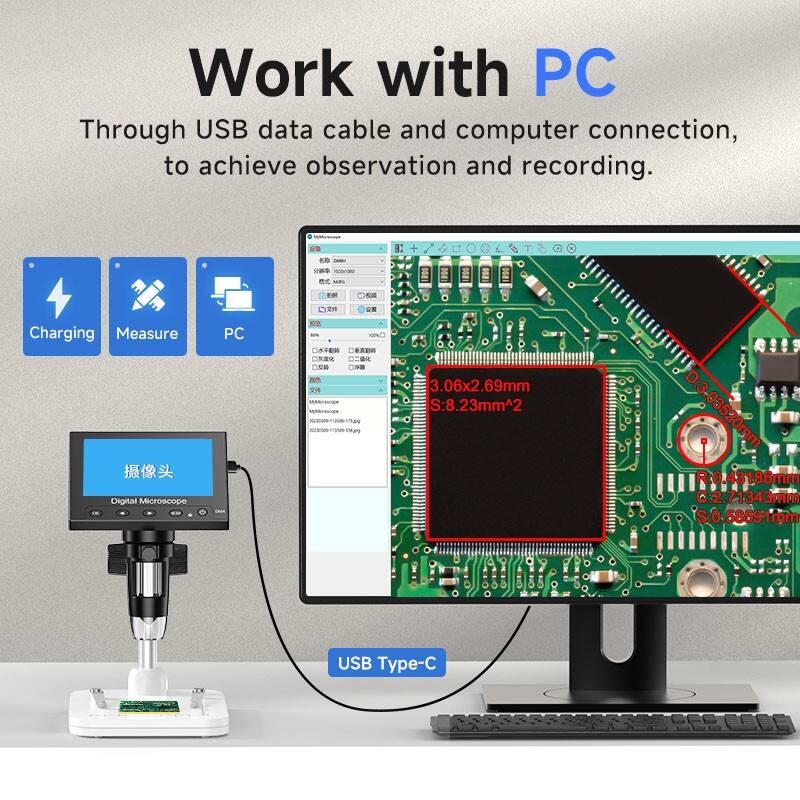
USB connectivity enables direct connection to computers for real-time viewing, advanced image processing, and integration with specialized software applications. Computer connectivity opens up possibilities for measurement tools, image analysis software, and integration with larger documentation systems or customer management platforms. The ability to stream live video to computer applications also facilitates remote collaboration and expert consultation for complex repairs.
Wi-Fi connectivity options are becoming increasingly common, allowing wireless streaming to tablets, smartphones, or computers without the constraints of physical connections. Wireless connectivity proves particularly valuable in crowded work environments where cable management can be challenging, or when multiple team members need to view the same work simultaneously from different locations.
HDMI output capabilities enable connection to larger external monitors or projectors for team training sessions, quality control meetings, or customer presentations. The ability to display work on larger screens facilitates group collaboration and makes it easier to point out specific details or discuss repair strategies with colleagues or customers.
Performance Considerations for Professional Use
Build Quality and Durability
Professional environments demand equipment that can withstand daily use while maintaining consistent performance over extended periods. Industrial-grade construction materials and robust mechanical designs ensure that the microscope for soldering applications can handle the demands of busy repair facilities and manufacturing environments. Solid metal construction for critical components such as the lens assembly and focusing mechanisms helps maintain optical alignment and prevents degradation of image quality over time.
Environmental considerations include resistance to dust, humidity, and temperature variations commonly encountered in electronics work environments. Sealed optical systems prevent contamination that could affect image quality, while robust housing designs protect sensitive electronic components from physical damage and environmental exposure. Heat dissipation systems ensure that internal electronics remain within operating temperature ranges even during extended use periods.
Modular design approaches allow for component replacement and upgrades without requiring complete system replacement, providing better long-term value and adaptability to changing requirements. Standardized mounting systems and interchangeable components enable customization for specific applications while maintaining compatibility with existing accessories and mounting hardware.
Software Features and User Interface
Intuitive control interfaces reduce learning curves and improve productivity by making it easier for technicians to access frequently used functions quickly. Touch-screen controls, when available, provide direct manipulation of settings and eliminate the need for separate control devices. Menu systems should be logically organized with clear labeling and responsive performance to minimize disruption of workflow during critical work phases.
Measurement and analysis tools built into the software provide capabilities for dimensional verification, component spacing analysis, and quality control documentation. Calibrated measurement systems ensure accuracy for critical dimensions, while comparison tools enable before-and-after analysis of repair work. Annotation capabilities allow technicians to mark specific areas of interest and add notes directly to captured images.
Customizable user profiles and settings storage enable multiple technicians to quickly configure the system for their individual preferences and specific application requirements. Profile switching capabilities are particularly valuable in shared work environments where different users may have varying magnification preferences, lighting settings, or documentation requirements.
Selection Criteria for Different Applications
Hobbyist and Educational Applications
Entry-level requirements for hobbyist and educational use typically focus on basic magnification capabilities, adequate lighting, and affordable pricing while maintaining sufficient image quality for learning and simple repair tasks. Systems in this category usually offer magnification ranges from 10x to 100x, which covers most common hobbyist applications including component identification, basic soldering inspection, and general PCB examination.
Educational applications benefit from systems that include comprehensive documentation capabilities to support learning objectives and assignment completion. Built-in measurement tools and image capture functionality enable students to document their work and demonstrate understanding of electronic component characteristics and proper assembly techniques. Durable construction suitable for classroom environments ensures longevity despite frequent handling by multiple users.
Budget considerations for hobbyist applications often require balancing features against cost, with priority given to core functionality over advanced features. However, investing in systems with upgrade capabilities can provide better long-term value as skills develop and application requirements become more sophisticated over time.
Professional and Industrial Requirements
Commercial repair facilities and manufacturing environments require systems capable of handling high-volume usage while maintaining consistent performance and reliability. Professional-grade systems typically offer extended magnification ranges, superior optical quality, and comprehensive documentation capabilities to support quality control and customer service requirements. Advanced illumination systems with multiple lighting modes and programmable presets streamline workflow and ensure consistent results across different operators.
Integration capabilities become critical in professional environments, where the microscope for soldering applications must work seamlessly with existing quality control systems, documentation procedures, and customer management platforms. Network connectivity, standardized file formats, and API compatibility enable integration with larger business systems and automated workflow processes.
Reliability and service support considerations include warranty coverage, technical support availability, and replacement part accessibility. Professional environments cannot afford extended downtime, making rapid service response and local service capabilities important factors in equipment selection decisions. Total cost of ownership calculations should include service costs, replacement part availability, and expected operational life when evaluating different system options.
FAQ
What magnification level is best for PCB soldering work?
The optimal magnification for PCB soldering depends on the specific components and tasks involved. For general soldering of through-hole components and larger surface-mount devices, magnifications between 10x and 50x are typically sufficient. Fine-pitch components, micro-BGA devices, and detailed inspection work require higher magnifications ranging from 100x to 200x. Most professional systems offer variable magnification to accommodate different application requirements within a single unit.
How important is LED lighting quality in a soldering microscope?
LED lighting quality is crucial for accurate color representation and shadow-free illumination during PCB work. High-quality LED systems provide consistent color temperature, typically around 6000K to 6500K for accurate component color identification. Ring light configurations with 16 or more LEDs offer optimal shadow reduction, while adjustable intensity controls allow customization for different materials and magnification levels. Poor lighting can lead to eye strain and missed defects during inspection.
Can digital microscopes replace traditional stereo microscopes for electronics work?
Digital microscopes offer several advantages over traditional stereo microscopes, including better ergonomics, documentation capabilities, and the ability to share views with multiple users simultaneously. However, some technicians prefer the three-dimensional perception provided by stereo microscopes for precise hand-eye coordination during soldering. The choice depends on individual preferences, specific application requirements, and whether documentation and sharing capabilities are important factors in the work environment.
What should I look for in terms of connectivity and documentation features?
Essential connectivity features include USB connection for computer integration, SD card storage for standalone operation, and HDMI output for external displays. Advanced systems may offer Wi-Fi connectivity for wireless streaming and remote collaboration. Documentation features should include high-resolution image capture, video recording capabilities, measurement tools, and annotation functions. File management systems with automatic organization and naming help maintain organized records across multiple projects and customers.