 EN
EN


Proper maintenance of your digital handheld microscope is crucial for ensuring optimal performance, extending operational lifespan, and maintaining accurate imaging capabilities. Unlike traditional laboratory microscopes, digital handheld microscope devices require specialized care protocols that account for their portable design, electronic components, and frequent handling in various environments. Understanding the fundamental maintenance requirements helps preserve the delicate optical systems, protect sensitive digital sensors, and maintain the precision focusing mechanisms that define quality microscopy performance.
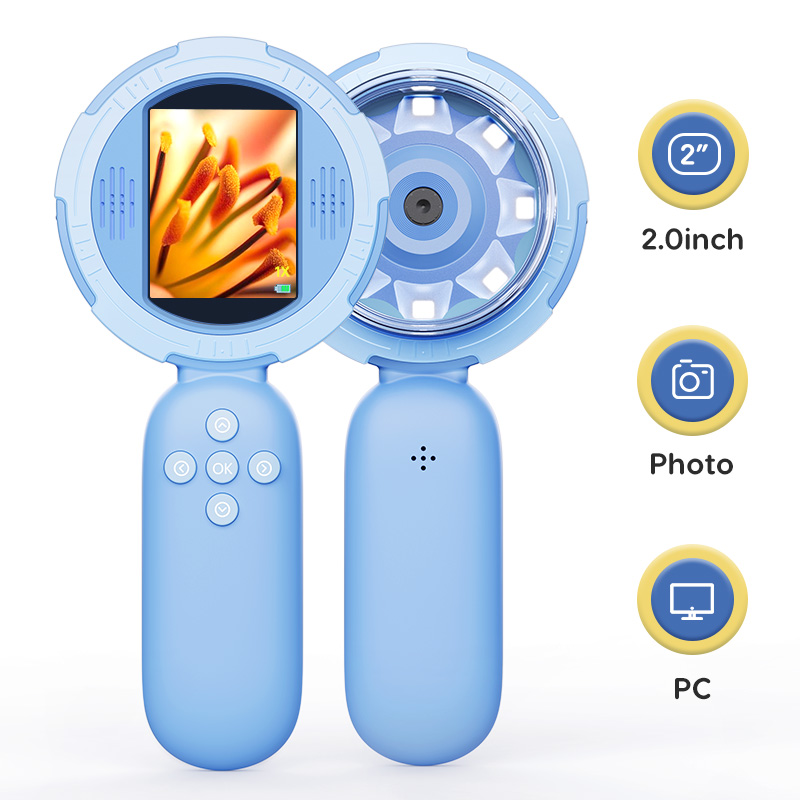
Professional maintenance approaches for digital handheld microscope equipment encompass systematic cleaning procedures, component inspection protocols, software updates, and preventive care measures designed to address the unique challenges of portable microscopy. Regular maintenance prevents common issues such as lens contamination, battery degradation, software glitches, and mechanical wear that can compromise imaging quality and operational reliability. This comprehensive guide provides practical maintenance strategies that ensure your digital handheld microscope continues delivering precise results across educational, research, and professional applications.
Understanding Digital Handheld Microscope Components
Critical Optical Elements
The optical system of a digital handheld microscope consists of multiple precision-engineered components that require careful maintenance attention. The primary objective lens represents the most critical element, as it directly influences image resolution, clarity, and magnification capabilities. This lens element typically features specialized coatings that enhance light transmission and reduce reflections, making it particularly susceptible to contamination from fingerprints, dust particles, and environmental deposits.
Secondary optical components include focusing mechanisms, internal mirrors, and light-directing elements that work together to deliver clear magnified images to the digital sensor. Each component requires specific cleaning techniques and handling procedures to prevent damage to delicate surfaces and maintain optimal optical performance. Regular inspection of these elements helps identify potential issues before they compromise overall system functionality.
The digital sensor assembly converts optical information into electronic signals for display and recording purposes. This component is particularly sensitive to environmental factors and requires protection from moisture, temperature fluctuations, and mechanical shock during normal operation and storage periods.
Electronic System Components
Modern digital handheld microscope devices incorporate sophisticated electronic systems that manage image capture, processing, storage, and display functions. The main processing unit coordinates all system operations while managing power consumption and thermal regulation. Regular maintenance of electronic components involves checking connection integrity, monitoring performance indicators, and ensuring proper software operation.
Battery management systems require particular attention, as portable microscopes depend on reliable power delivery for consistent operation. Proper battery maintenance includes regular charging cycles, temperature monitoring, and replacement scheduling based on performance degradation indicators. Understanding battery chemistry and optimal charging practices helps maximize operational time and prevents unexpected power failures during critical observations.
Display systems, whether integrated screens or external connectivity options, require regular calibration and cleaning to ensure accurate image representation. Color accuracy, brightness consistency, and resolution clarity all depend on proper display maintenance protocols that address both hardware and software aspects of the viewing system.
Essential Cleaning Procedures
Lens Cleaning Protocols
Proper lens cleaning represents the most critical maintenance procedure for any digital handheld microscope, as optical clarity directly impacts imaging performance. Begin lens cleaning by powering down the device and allowing it to reach room temperature to prevent thermal stress on optical components. Use only approved lens cleaning solutions and lint-free cleaning cloths specifically designed for precision optical applications.
Start the cleaning process by gently removing loose dust particles using a soft-bristled brush or compressed air applied at low pressure from a safe distance. Never use household cleaning products, alcohol-based solutions, or abrasive materials that can damage specialized lens coatings. Apply cleaning solution sparingly to the cleaning cloth rather than directly onto the lens surface to prevent liquid infiltration into internal components.
Execute the cleaning motion using circular patterns from the lens center outward, applying minimal pressure to avoid scratching delicate surfaces. Complete the cleaning process by inspecting the lens surface under proper lighting conditions to ensure complete removal of contaminants and verify coating integrity remains intact.
Housing and External Component Care
External housing maintenance for your digital handheld microscope involves regular cleaning and inspection of all accessible surfaces and control elements. Use mild soap solutions and damp cloths to clean non-optical surfaces, ensuring that moisture does not penetrate into internal compartments through seams, buttons, or connection ports.
Pay special attention to grip surfaces, control buttons, and connection ports that experience frequent handling and potential contamination. These areas often accumulate oils, dirt, and debris that can interfere with proper operation and create hygiene concerns in shared-use environments. Regular cleaning prevents buildup that could lead to mechanical problems or operational failures.
Inspect all external connections, including USB ports, memory card slots, and charging interfaces, for signs of corrosion, debris accumulation, or mechanical damage. Clean these connections using appropriate tools and ensure proper function through gentle testing procedures that verify connectivity and data transfer capabilities.
Preventive Maintenance Strategies
Environmental Protection Measures
Environmental protection forms the foundation of effective digital handheld microscope maintenance, as these devices often operate in challenging conditions that can accelerate wear and contamination. Implement proper storage procedures that maintain optimal temperature and humidity levels while protecting the instrument from dust, moisture, and mechanical shock during transport and storage periods.
Create dedicated storage solutions using padded cases or protective containers that provide cushioning against impacts while allowing air circulation to prevent moisture accumulation. Avoid storage in extreme temperature environments, direct sunlight, or areas with high humidity that can promote condensation formation and accelerate component degradation.
Establish handling protocols that minimize exposure to contaminants and reduce mechanical stress on delicate components. Train users on proper grip techniques, carrying procedures, and operational practices that protect the digital handheld microscope from damage while ensuring consistent performance across different applications and user skill levels.
Systematic Inspection Schedules
Develop comprehensive inspection schedules that address all critical components and functions of your digital handheld microscope on regular intervals. Daily inspection procedures should include basic functionality checks, lens condition assessment, and battery level monitoring to identify immediate issues that could affect operational capabilities.
Weekly inspection protocols extend to more detailed component examination, including focus mechanism operation, image quality verification, and software performance evaluation. These inspections help identify developing problems that require attention before they compromise system reliability or imaging accuracy.
Monthly comprehensive inspections involve thorough cleaning procedures, calibration verification, and detailed documentation of component condition and performance metrics. This systematic approach enables trend analysis and predictive maintenance planning that reduces unexpected failures and extends overall equipment lifespan.
Software Maintenance and Updates
Firmware Management
Regular firmware updates ensure your digital handheld microscope operates with the latest performance enhancements, bug fixes, and security improvements provided by the manufacturer. Establish a routine schedule for checking available updates and implementing them according to manufacturer guidelines and organizational change management protocols.
Before installing firmware updates, create backup copies of current settings, calibration data, and any custom configurations that might be affected by the update process. Document the current firmware version and system performance characteristics to enable rollback procedures if compatibility issues arise with new firmware versions.
Test updated firmware thoroughly in controlled conditions before deploying the digital handheld microscope for critical applications. Verify that all functions operate correctly, image quality meets standards, and any new features integrate properly with existing workflows and procedures.
Software Application Maintenance
Companion software applications that support digital handheld microscope operation require regular maintenance to ensure optimal performance and compatibility with evolving operating systems and hardware configurations. Keep software applications current with the latest versions while testing compatibility with your specific microscope model and operational requirements.
Regularly clear temporary files, cache data, and old image files that can accumulate and slow system performance over time. Organize stored images and data according to established file management protocols that facilitate easy retrieval while preventing storage capacity issues that could interfere with normal operation.
Verify that backup procedures capture both application settings and stored microscopy data on regular intervals. Test recovery procedures periodically to ensure that critical data remains accessible and operational settings can be restored quickly in case of system failures or data corruption incidents.
Troubleshooting Common Issues
Image Quality Problems
Image quality degradation in digital handheld microscope systems often results from optical contamination, improper focus settings, or environmental factors that affect light transmission and sensor performance. Begin troubleshooting by systematically examining each component in the optical path, starting with the objective lens and working through the entire system to identify contamination sources.
Focus mechanism problems can manifest as difficulty achieving sharp images, inconsistent focus across the field of view, or mechanical binding that prevents smooth adjustment. These issues typically result from debris in focus tracks, worn mechanical components, or calibration drift that requires professional service attention to restore proper operation.
Color accuracy problems and exposure inconsistencies often indicate sensor calibration issues or software configuration problems that require systematic troubleshooting procedures. Document specific problem symptoms and operating conditions to facilitate effective diagnosis and resolution of complex image quality issues.
Electronic System Malfunctions
Electronic system problems in digital handheld microscope devices can range from simple power management issues to complex component failures that require professional repair services. Begin troubleshooting electronic problems by verifying power supply integrity, checking all connections, and performing basic reset procedures according to manufacturer guidelines.
Battery-related problems often cause intermittent operation, unexpected shutdowns, or reduced operational time that interferes with normal microscopy activities. Evaluate battery condition using built-in diagnostic tools and consider replacement when performance degrades below acceptable thresholds for your application requirements.
Software crashes, connectivity problems, and data transfer issues typically require systematic troubleshooting that includes driver verification, connection testing, and software reinstallation procedures. Maintain detailed logs of electronic problems to identify patterns that might indicate developing hardware failures requiring professional attention.
FAQ
How often should I clean the lens of my digital handheld microscope?
Clean the lens of your digital handheld microscope after every use session, or immediately if you notice any contamination affecting image quality. For regular use environments, inspect the lens daily and perform thorough cleaning weekly using approved optical cleaning solutions and lint-free cloths. In dusty or humid conditions, increase cleaning frequency to prevent accumulation of contaminants that could permanently damage lens coatings.
What should I do if my digital handheld microscope won't hold focus properly?
If your digital handheld microscope experiences focus problems, first check for debris in the focus mechanism tracks and clean gently with compressed air. Verify that the objective lens is clean and properly seated in its mount. If mechanical binding persists, avoid forcing the focus controls and contact professional service support, as internal mechanical components may require calibration or replacement to restore proper operation.
Can I use regular household cleaners on my digital handheld microscope?
Never use household cleaners, alcohol-based solutions, or abrasive materials on your digital handheld microscope, as these can damage specialized lens coatings and electronic components. Use only approved optical cleaning solutions for lens elements and mild soap solutions for external housing surfaces. Avoid getting moisture into connection ports, buttons, or internal compartments during cleaning procedures.
How do I know when my digital handheld microscope battery needs replacement?
Replace your digital handheld microscope battery when operational time decreases significantly below normal expectations, when the device shuts down unexpectedly under normal load conditions, or when charging cycles become abnormally long. Most modern devices include battery health indicators in their software that provide specific guidance about battery condition and replacement timing based on actual performance metrics.