 EN
EN

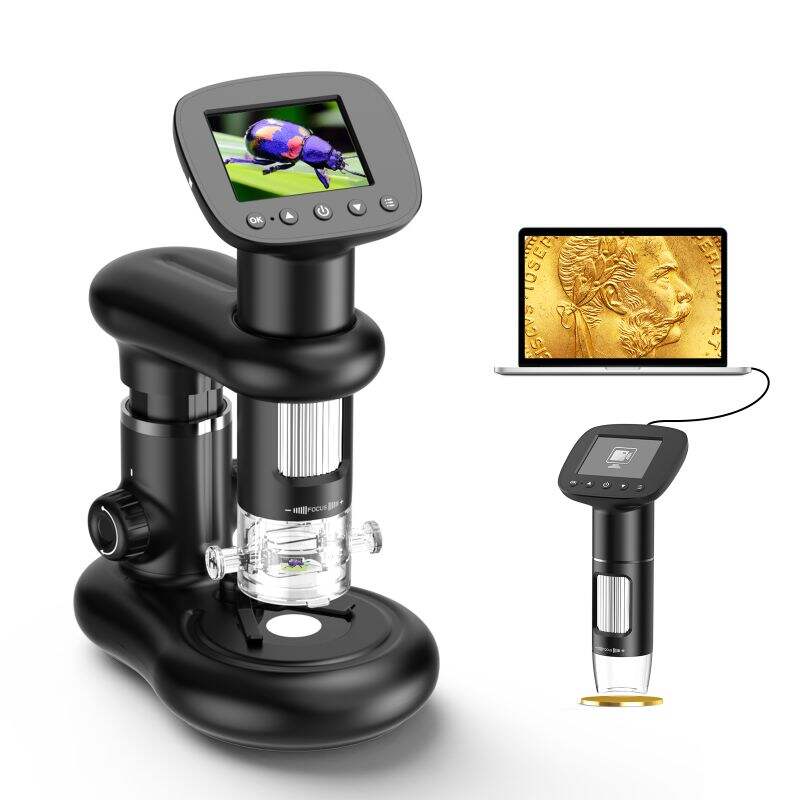
Selecting the right digital microscope camera requires understanding your specific imaging requirements, workflow constraints, and the technical specifications that directly impact your research or inspection quality. The perfect digital microscope camera balances resolution capabilities, sensor performance, connectivity options, and software compatibility to deliver consistent, high-quality results across diverse applications from biological research to industrial quality control.
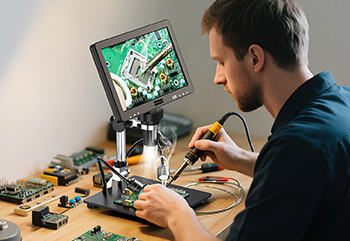
Making an informed choice involves evaluating multiple technical parameters that determine imaging performance, including sensor size, pixel density, frame rates, and color reproduction accuracy. Additionally, practical considerations such as mounting compatibility, software integration, and long-term reliability must align with your laboratory or industrial environment to ensure the digital microscope camera delivers optimal value and functionality throughout its operational lifespan.
Understanding Core Technical Specifications
Resolution and Sensor Performance
The foundation of any quality digital microscope camera lies in its sensor technology and resolution capabilities. Modern digital microscope camera systems typically offer resolutions ranging from 1080p to 4K and beyond, with each resolution tier serving specific application requirements. Higher resolution sensors capture finer detail and enable greater digital magnification without significant quality degradation, making them essential for detailed structural analysis and precise measurement applications.
Sensor size directly influences light gathering capability and image quality, particularly in low-light microscopy conditions. Larger sensors generally provide better signal-to-noise ratios and improved dynamic range, resulting in clearer images with reduced digital noise. When evaluating a digital microscope camera, consider the relationship between pixel size and sensor dimensions, as smaller pixels may increase resolution but potentially reduce individual pixel light sensitivity.
Color accuracy and bit depth represent critical factors for applications requiring precise color reproduction or quantitative analysis. Professional-grade digital microscope camera systems often provide 12-bit or 16-bit color depth, enabling more accurate representation of specimen details and supporting advanced image processing workflows that depend on subtle color variations for analysis purposes.
Frame Rate and Processing Capabilities
Frame rate performance determines the digital microscope camera's suitability for dynamic imaging applications and real-time observation workflows. Standard applications typically require frame rates between 15-30 fps for smooth live viewing, while specialized applications such as particle tracking or fluid dynamics analysis may demand higher frame rates up to 60 fps or beyond.
Processing capabilities within the digital microscope camera affect image quality and system responsiveness. Advanced cameras incorporate hardware-based image processing features such as automatic exposure control, white balance adjustment, and noise reduction algorithms that operate in real-time without requiring external processing power. These built-in capabilities reduce computational load on connected computers and enable more responsive user interfaces.
Buffer memory and data transfer rates impact the camera's ability to maintain consistent performance during extended imaging sessions. Adequate buffer capacity prevents frame dropping during high-speed capture sequences, while faster data transfer interfaces ensure smooth operation when working with high-resolution images or video streams.
Connectivity and Compatibility Considerations
Interface Options and Data Transfer
Modern digital microscope camera systems offer various connectivity options, each presenting distinct advantages for different applications and system configurations. USB 3.0 connections provide reliable data transfer rates suitable for most standard applications while maintaining broad compatibility across computer systems and operating platforms. USB-C interfaces offer enhanced data transfer capabilities and simplified connection management, particularly beneficial for portable or laptop-based microscopy setups.
Ethernet connectivity enables network-based imaging workflows and remote operation capabilities, making the digital microscope camera accessible from multiple workstations or enabling centralized data management systems. This connectivity option proves particularly valuable in shared laboratory environments or when implementing automated imaging protocols that require integration with larger laboratory information management systems.
Wireless connectivity options, while less common in professional microscopy applications, provide flexibility for portable applications and situations where cable management presents challenges. However, wireless connections typically involve some compromise in data transfer rates and may introduce latency that affects real-time imaging performance.
Software Integration and Operating System Support
Software compatibility represents a fundamental consideration when selecting a digital microscope camera, as the imaging software directly impacts user experience and functional capabilities. Native support for major operating systems including Windows, macOS, and Linux ensures broad deployment flexibility and reduces integration challenges in diverse computing environments.
Advanced imaging software packages often provide specialized features such as measurement tools, image analysis capabilities, and automated capture sequences that enhance the digital microscope camera's utility for specific applications. Compatibility with third-party imaging software or programming interfaces enables custom workflow development and integration with existing laboratory data management systems.
Driver stability and update frequency affect long-term system reliability and compatibility with evolving operating system versions. Established manufacturers typically provide regular driver updates and technical support that ensure continued compatibility and optimal performance throughout the camera's operational life.
Application-Specific Selection Criteria
Biological and Medical Applications
Biological microscopy applications place specific demands on digital microscope camera performance, particularly regarding color accuracy, resolution, and sensitivity. Medical and biological specimens often require precise color reproduction for accurate diagnosis or analysis, making color calibration capabilities and consistent color temperature performance essential selection criteria.
Low-light performance becomes critical when working with fluorescence microscopy or live cell imaging applications where excessive illumination may damage specimens. A high-quality digital microscope camera designed for biological applications typically incorporates sensitive sensors capable of producing clear images under minimal illumination conditions while maintaining acceptable noise levels.
Time-lapse imaging capabilities support long-term biological observation studies and cell development tracking applications. The digital microscope camera should provide consistent performance across extended imaging sessions while maintaining stable color balance and exposure settings throughout the observation period.
Industrial Inspection and Quality Control
Industrial applications often prioritize measurement accuracy, repeatability, and integration with automated inspection systems. The digital microscope camera must deliver consistent imaging performance that supports precise dimensional measurements and defect detection across varying environmental conditions and production schedules.
High-resolution capabilities enable detailed inspection of small components and surface features, while fast capture rates support high-throughput inspection workflows. The digital microscope camera should maintain image quality consistency across different magnification levels and lighting conditions to ensure reliable inspection results.
Durability and environmental resistance become important factors in industrial settings where cameras may experience temperature variations, vibration, or dust exposure. Professional-grade cameras typically incorporate robust construction and protective features that maintain performance reliability in challenging operational environments.
Mounting and Physical Integration
Microscope Compatibility and Mounting Systems
Physical compatibility between the digital microscope camera and existing microscopy equipment determines installation feasibility and optical performance. Standard mounting interfaces such as C-mount or CS-mount connections provide broad compatibility across different microscope brands and models, while proprietary mounting systems may offer enhanced integration but limit flexibility for future upgrades.
Optical considerations including parfocal adjustment and magnification factors affect image quality and measurement accuracy. The digital microscope camera should maintain focus consistency when switching between different objective lenses, and any magnification changes introduced by the camera's optical system should be clearly documented and calibrated for accurate measurements.
Physical dimensions and weight distribution impact microscope stability and handling characteristics. Larger cameras may require additional support mechanisms to prevent strain on microscope components, while compact designs offer installation flexibility but may involve compromises in sensor size or feature availability.
Ergonomic and Workflow Considerations
User interface design and control accessibility affect operational efficiency and user fatigue during extended imaging sessions. The digital microscope camera should provide intuitive control mechanisms and clear visual feedback that support efficient workflow management without requiring frequent attention shifts between hardware controls and software interfaces.
Cable management and connectivity layout influence workstation organization and user mobility. Well-designed camera systems incorporate thoughtful cable routing and connection placement that minimize workspace clutter and reduce the risk of accidental disconnections during normal operation.
Maintenance accessibility and cleaning procedures impact long-term operational costs and system reliability. The digital microscope camera should provide easy access for routine cleaning and maintenance tasks while protecting sensitive optical and electronic components from contamination or damage during these procedures.
Budget and Long-Term Value Assessment
Initial Investment and Feature Balance
Budget considerations for digital microscope camera selection involve balancing immediate functional requirements against long-term upgrade potential and operational costs. Entry-level cameras typically provide adequate performance for basic documentation and measurement tasks, while professional-grade systems offer enhanced capabilities that support advanced applications and provide greater upgrade flexibility.
Feature prioritization should align with primary application requirements while considering potential future needs and workflow evolution. Investing in slightly higher specifications than currently required often proves cost-effective when application demands increase or new analytical techniques are introduced to existing workflows.
Warranty coverage and technical support availability represent important value factors that affect total ownership costs and operational reliability. Established manufacturers typically provide comprehensive support services and replacement part availability that protect the long-term investment in digital microscope camera systems.
Operating Costs and Upgrade Considerations
Ongoing operational costs include software licensing fees, calibration requirements, and potential component replacement needs that accumulate throughout the camera's operational life. The digital microscope camera should provide stable performance characteristics that minimize calibration frequency and reduce maintenance requirements over time.
Upgrade pathway planning considers interface compatibility and software evolution trends that affect long-term system viability. Cameras with standard interfaces and broad software support typically offer better upgrade flexibility and protection against obsolescence compared to proprietary systems with limited compatibility options.
Technology advancement rates in digital imaging suggest that cameras purchased today should provide useful service life of five to seven years before requiring significant upgrades. Planning replacement cycles based on technological advancement patterns and application requirement evolution helps optimize investment timing and maintain competitive capabilities.
FAQ
What resolution should I choose for my digital microscope camera?
Resolution choice depends on your specific application requirements and viewing conditions. For general documentation and basic measurements, 1080p resolution typically provides sufficient detail and processing efficiency. Applications requiring fine detail analysis or high-magnification digital zoom capabilities benefit from 4K or higher resolutions. Consider that higher resolutions require more storage space and processing power, so balance resolution needs against system capabilities and workflow efficiency requirements.
How important is color accuracy in a digital microscope camera?
Color accuracy becomes critical for applications involving specimen identification, medical diagnosis, or quality control processes that depend on color characteristics. Professional biological and medical applications typically require excellent color reproduction with consistent color temperature performance. Industrial applications may prioritize other factors such as resolution or speed over color accuracy unless color-based inspection criteria are involved in the quality control process.
Can I use any digital microscope camera with my existing microscope?
Compatibility depends on the mounting interface and optical design of both your microscope and the camera. Most modern microscopes use standard C-mount or CS-mount interfaces that accept compatible cameras, but you should verify mounting compatibility and optical specifications before purchase. Some microscopes may require adapter rings or optical adjustments to achieve proper focus and magnification calibration with specific camera models.
What connectivity option provides the best performance for digital microscope cameras?
USB 3.0 connections offer the best balance of performance, compatibility, and reliability for most applications. USB 3.0 provides sufficient data transfer rates for high-resolution imaging while maintaining broad compatibility across computer systems. Ethernet connections support network integration and remote operation but may introduce slight latency. Choose connectivity based on your specific workflow requirements, system integration needs, and performance priorities rather than just maximum theoretical transfer rates.