 EN
EN

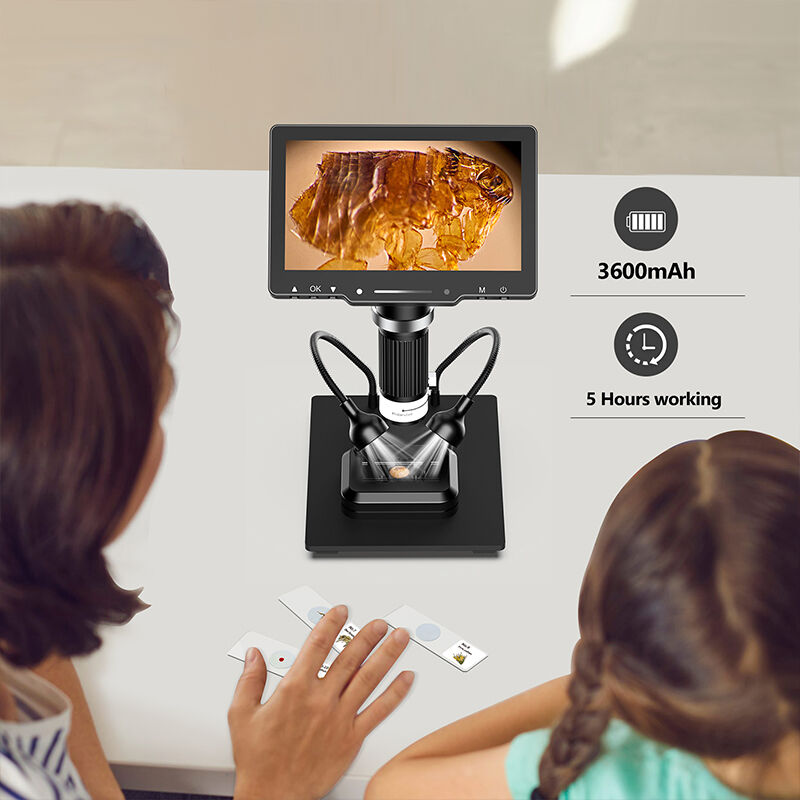
Understanding the fundamentals of a digital microscope camera is essential for anyone entering the world of microscopic imaging. Whether you're a student beginning research work, an educator setting up classroom demonstrations, or a hobbyist exploring the microscopic world, a digital microscope camera transforms traditional microscopy by combining optical magnification with modern digital imaging technology. This comprehensive guide breaks down the essential components, features, and operational principles that every beginner should understand before making their first purchase or setting up their imaging system.

The transition from traditional eyepiece-based microscopy to digital imaging represents a significant advancement in accessibility and functionality. A digital microscope camera eliminates the need for direct eyepiece viewing by capturing images through an integrated camera sensor, displaying results on computer screens or built-in displays. This technology democratizes microscopy by allowing multiple viewers to observe specimens simultaneously, enabling easy documentation of findings, and providing the ability to measure, annotate, and analyze images using software tools that would be impossible with conventional optical microscopes.
Core Components and Technology
Camera Sensor Fundamentals
The heart of any digital microscope camera lies in its image sensor, typically either a CMOS or CCD chip that converts optical information into digital data. CMOS sensors are most common in modern systems due to their lower power consumption, faster readout speeds, and cost-effectiveness. The sensor resolution, measured in megapixels, directly impacts image detail and the ability to crop or zoom into specific areas without losing clarity. Most beginner-friendly digital microscope camera models feature sensors ranging from 2 to 8 megapixels, providing adequate resolution for educational and basic research applications.
Pixel size within the sensor affects light sensitivity and image quality under different illumination conditions. Larger pixels generally capture more light, improving performance in low-light situations common in microscopy. The sensor's dynamic range determines how well the digital microscope camera can capture both bright and dark areas within the same specimen, crucial for samples with varying transparency or reflectivity. Understanding these sensor characteristics helps beginners select equipment appropriate for their intended applications and lighting conditions.
Optical System Integration
The optical pathway in a digital microscope camera begins with the objective lens, which provides primary magnification and determines the working distance and field of view. Unlike traditional microscopes where multiple eyepiece and objective combinations create the final magnification, digital systems rely on the interplay between optical magnification and digital zoom capabilities. The objective lens focuses light onto the camera sensor, and additional relay lenses may be used to optimize the light path and ensure proper sensor illumination.
Illumination systems in digital microscope camera setups typically use LED lighting for consistent color temperature and long operational life. The lighting can be transmitted (from below the specimen), reflected (from above), or polarized for specific material analysis. The integration of adjustable intensity controls allows users to optimize contrast and reduce glare, essential skills for beginners learning to balance illumination for different specimen types. Proper understanding of how optical and digital components work together enables users to achieve optimal image quality across various magnification levels.
Magnification and Resolution Concepts
Understanding True vs Digital Magnification
One of the most critical concepts for beginners involves distinguishing between optical magnification and digital zoom when evaluating a digital microscope camera. Optical magnification occurs through the lens system before light reaches the sensor, providing genuine detail enhancement by gathering more light from smaller specimen areas. This type of magnification maintains image quality and reveals actual structural details that exist in the specimen. Digital zoom, conversely, electronically enlarges the captured image by interpolating pixel data, which can make images appear larger without adding new detail.
Most digital microscope camera systems specify total magnification as the combination of optical and digital factors, but beginners should focus primarily on optical capabilities when comparing models. A system with 10x optical magnification and 10x digital zoom provides the same level of actual detail as one with 10x optical magnification alone, despite the higher total magnification number. Understanding this distinction prevents disappointment when expecting to see cellular details that simply aren't captured by the optical system, regardless of how much the image is digitally enlarged.
Resolution Limits and Practical Considerations
The effective resolution of a digital microscope camera depends on both the optical system's ability to distinguish fine details and the sensor's capability to capture that information digitally. The numerical aperture of the objective lens determines the theoretical resolution limit, while factors like illumination quality, specimen preparation, and focus accuracy affect practical resolution in real-world use. Beginners often expect unlimited detail with higher magnification, but physics imposes fundamental limits on how small features can be resolved.
Working distance represents another crucial consideration that affects both magnification and practical usability. Higher magnification objectives typically require closer proximity to specimens, limiting the types of samples that can be examined and making focus adjustment more sensitive. A digital microscope camera with variable magnification capabilities allows beginners to find the optimal balance between detail level and working convenience for their specific applications. Understanding these relationships helps users set realistic expectations and choose appropriate magnification levels for different observation tasks.
Software and Connectivity Features
Computer Interface and Compatibility
Modern digital microscope camera systems typically connect to computers via USB interfaces, providing both data transfer and power delivery through a single cable. USB 2.0 connections suffice for basic imaging needs, while USB 3.0 offers faster data transfer rates beneficial for high-resolution imaging or video recording. Compatibility with different operating systems varies by manufacturer, with most supporting Windows platforms and increasing numbers offering Mac and even mobile device compatibility.
The bundled software significantly impacts the user experience and functionality available to beginners. Basic capture software allows image and video recording with simple controls, while advanced packages include measurement tools, image enhancement filters, focus stacking capabilities, and annotation features. Some digital microscope camera models support generic USB Video Class (UVC) drivers, enabling compatibility with third-party software and providing flexibility for users who prefer specific applications or need integration with existing workflows.
Image Processing and Analysis Capabilities
Built-in image processing features help beginners achieve better results without requiring extensive photography knowledge. Automatic exposure control adjusts for varying specimen brightness, while white balance correction ensures accurate color reproduction under different lighting conditions. Many digital microscope camera systems include real-time image enhancement filters that can improve contrast, reduce noise, or highlight specific features during live observation.
Measurement and analysis tools transform the digital microscope camera from a simple imaging device into a quantitative instrument. Basic software typically includes linear measurement capabilities, allowing users to determine the size of specimen features when proper calibration is performed. More advanced features might include area calculations, angle measurements, and particle counting functions. Understanding how to calibrate these tools and interpret measurement results accurately is essential for beginners who need quantitative data from their observations.
Practical Setup and Operation Guidelines
Installation and Initial Configuration
Setting up a digital microscope camera system begins with proper software installation and driver configuration. Most manufacturers provide installation packages that include both device drivers and imaging software, though some systems work with generic drivers for immediate plug-and-play operation. Beginners should verify system compatibility before purchase and ensure their computer meets minimum requirements for smooth operation, particularly regarding USB port specifications and available processing power.
Initial configuration involves adjusting the digital microscope camera for optimal image quality through software controls. This includes setting appropriate resolution and frame rate for the intended use, configuring exposure settings for the available lighting, and establishing proper color balance. Many systems include automatic adjustment features that help beginners achieve good results immediately, while manual controls allow refinement as users develop more experience with the equipment.
Focus and Illumination Techniques
Achieving sharp focus with a digital microscope camera requires understanding the relationship between magnification level, depth of field, and focusing technique. Higher magnifications provide less depth of field, making precise focus more critical and specimen movement more noticeable. Beginners should start with lower magnifications to locate and center specimens before increasing magnification for detailed observation. The live preview capability of digital systems makes focus adjustment more intuitive than traditional eyepiece-based microscopes.
Illumination adjustment significantly affects image quality and the ability to discern specimen details. The digital microscope camera display provides immediate feedback on illumination effects, allowing users to optimize lighting intensity and angle for best contrast. Overillumination can wash out details and create glare, while insufficient lighting results in noise and poor contrast. Learning to balance these factors through the software interface helps beginners consistently achieve high-quality images across different specimen types and magnification levels.
Applications and Use Cases
Educational and Teaching Applications
Digital microscope camera technology revolutionizes science education by enabling simultaneous viewing among entire classrooms and facilitating easy documentation of observations. Teachers can project live images for group discussions, capture examples for future lessons, and allow students to share discoveries with their peers. The ability to save and annotate images creates permanent records of laboratory work that support assessment and review processes.
Student engagement increases significantly when microscopy becomes a collaborative rather than individual activity. The digital microscope camera removes the intimidation factor often associated with traditional microscopes, allowing students to focus on observation and analysis rather than struggling with eyepiece adjustment and focusing techniques. Time efficiency improves as multiple students can simultaneously view the same specimen, and teachers can quickly demonstrate proper techniques and highlight important features visible on the shared display.
Hobbyist and Personal Interest Projects
Hobbyist applications for digital microscope camera systems span diverse interests from coin and stamp collecting to electronics repair and natural specimen examination. The documentation capabilities enable collectors to create detailed records of their items, while the measurement tools help verify authenticity and assess condition. Electronics enthusiasts use digital magnification for component identification, solder joint inspection, and circuit board analysis in repair and modification projects.
Nature enthusiasts find endless fascination in examining everyday objects at high magnification, from fabric weaves and paper textures to plant structures and mineral crystals. The digital microscope camera makes these explorations more rewarding by enabling easy sharing of discoveries through captured images and videos. Social media integration features in some software packages allow direct posting of microscopic images, creating communities around shared microscopy interests and encouraging continued exploration.
FAQ
What magnification range is best for beginners starting with a digital microscope camera?
For beginners, a magnification range of 10x to 200x provides the most practical and versatile starting point. This range allows examination of common specimens like insects, plant parts, fabrics, and electronic components without requiring specialized preparation techniques. Higher magnifications above 400x become more challenging to use effectively and typically require more advanced skills in specimen preparation, focusing, and illumination control.
How important is camera resolution when choosing a digital microscope camera for basic use?
Camera resolution between 2-5 megapixels suffices for most beginner applications, providing adequate detail for screen viewing, basic measurements, and standard documentation needs. While higher resolution sensors capture more detail, they also require more computer processing power and storage space. The optical quality of the lens system typically limits practical resolution more than the camera sensor in entry-level systems, making extremely high-resolution sensors unnecessary for beginners.
Can a digital microscope camera work with tablets and smartphones instead of computers?
Many modern digital microscope camera models support direct connection to Android devices and some iPads through USB adapters or wireless connectivity. However, functionality may be limited compared to computer-based operation, with reduced software features and processing capabilities. Some manufacturers offer dedicated mobile apps that provide basic imaging and measurement functions, making portable operation possible for field work or situations where computer access is impractical.
What maintenance does a digital microscope camera require for reliable operation?
Digital microscope camera maintenance involves regular cleaning of optical surfaces with appropriate lens cleaning materials, protecting the system from dust and moisture when not in use, and keeping software updated for optimal performance and compatibility. The LED illumination systems typically require no maintenance due to their long lifespan, while mechanical focusing systems benefit from occasional lubrication if they become stiff. Proper storage in protective cases or covers prevents damage to delicate optical components and extends system lifespan significantly.
Table of Contents
- Core Components and Technology
- Magnification and Resolution Concepts
- Software and Connectivity Features
- Practical Setup and Operation Guidelines
- Applications and Use Cases
-
FAQ
- What magnification range is best for beginners starting with a digital microscope camera?
- How important is camera resolution when choosing a digital microscope camera for basic use?
- Can a digital microscope camera work with tablets and smartphones instead of computers?
- What maintenance does a digital microscope camera require for reliable operation?